
This content originally appeared on Stefan Judis Web Development and was authored by Stefan Judis
I recently saw an interesting tip from Paul Irish on Twitter. He shared that he uses git diff not only for reviewing git changes but also for general file diffing. If you use the --no-index argument, you can compare any files. These files can be outside of git repositories, too.
This discovery is beautiful because I recently spent quite a bit of time tweaking my git diff command using delta. And I love it when things look consistent in my terminal.
A new default diff command
Section titled A new default `diff` command
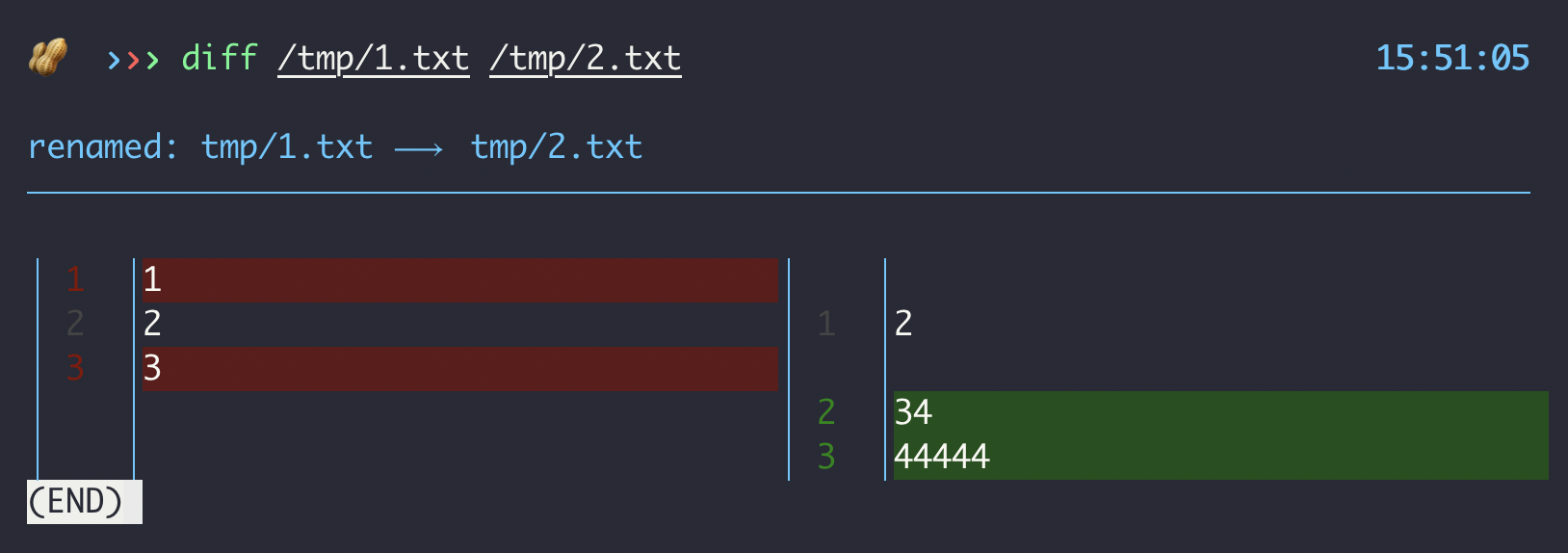
I added a new diff command to my zsh setup. It overwrites the default diff command and uses git diff --no-index instead. In only does that, though, if there are exactly two command arguments. Otherwise falls back to the default diff behavior.
function diff() {
  if [ "$#" -ne 2 ]; then
    command diff "$@"
    return
  fi

  git diff --no-index $1 $2;
}
See below how my new diff fileA fileB command looks like now!
Reply to Stefan
This content originally appeared on Stefan Judis Web Development and was authored by Stefan Judis

Stefan Judis | Sciencx (2020-10-17T22:00:00+00:00) How to use git’s file diff outside of git repositories (#snippet). Retrieved from https://www.scien.cx/2020/10/17/how-to-use-gits-file-diff-outside-of-git-repositories-snippet/
Please log in to upload a file.
There are no updates yet.
Click the Upload button above to add an update.